

Troubleshooting notifications
A reminder can look correctly set up in MyArvo and still not arrive, because most of the causes below sit between your browser and your operating system, outside MyArvo’s control.
Start with a test
Section titled “Start with a test”Before anything else, go to Settings → Notifications → Your devices and select Test on the device in question. See Confirming a device actually works.
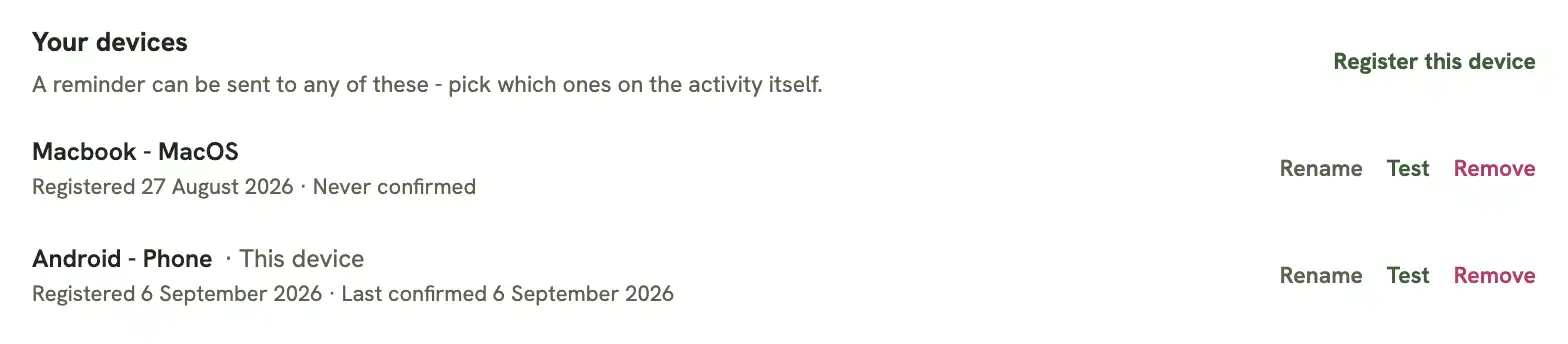
A successful test confirms MyArvo’s side is working correctly: the reminder was created, and the push was sent and accepted. If nothing arrives after that, the cause is one of the following, specific to that device or browser, not your account or how the reminder was set up.
Notification permission is blocked at the OS level
Section titled “Notification permission is blocked at the OS level”This is the most common cause. Your browser’s own site permission can say “Allow”, and MyArvo’s record for that device can even show Last confirmed today, meaning the push was genuinely sent and accepted, while the operating system is still silently blocking it, because the browser itself isn’t allowed to show notifications at the OS level. Check:
- macOS: System Settings → Notifications → (your browser) — make sure it’s allowed, and set to Alerts or Banners, not None
- Windows: Settings → System → Notifications — make sure the browser is allowed
Firefox’s “Do Not Disturb”
Section titled “Firefox’s “Do Not Disturb””Separate from the OS setting above, and separate from MyArvo’s own
per-site permission, Firefox has its own global toggle that silently
mutes notifications from every website. Check it via the padlock icon in
the address bar, or go to about:preferences#privacy → Notifications →
Settings → make sure Do Not Disturb is unchecked.
Safari needs the app installed
Section titled “Safari needs the app installed”If you’re on Safari, on an iPhone, iPad, or Mac, check this one first. It’s an Apple restriction on Safari specifically; Chrome, Firefox, and Edge don’t have it. A plain Safari tab can request notification permission and look like it’s working, but Safari will never actually deliver a push unless MyArvo has been added to:
- iPhone / iPad: the Home Screen (Share → Add to Home Screen)
- Mac: the Dock (Safari’s File menu → Add to Dock)
See iPhone, iPad, and Mac Safari.
The browser needs to be running
Section titled “The browser needs to be running”Unlike a phone’s OS-level push, most desktop browsers only receive web push while they’re actually open, at least in the background. Chrome has a setting, Continue running background apps when Google Chrome is closed, that extends this, but by default a fully closed browser won’t get anything until it’s reopened.