

The event brief
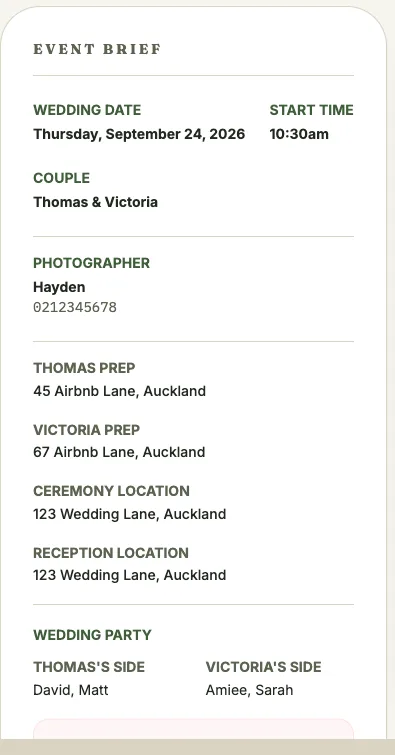
Crew and collaborators shouldn’t have to dig through the timeline to find the ceremony address or the on-site contact. Every event page includes a brief for exactly that: a summary panel with the details they need at a glance.
What’s shown
Section titled “What’s shown”The brief always includes the event date, start time, and client or couple names. Beyond that, what shows depends on the event category and type:
- Weddings: partner prep locations, ceremony and reception locations, wedding party names on each side, and an emergency contact
- Commercial shoots: the primary shoot location, an on-site contact, and a deliverables note
- Live streams: a link to the stream instead of physical locations
- Photographer / videographer contacts: name and phone number for each, when set
Locations link to Google Maps
Section titled “Locations link to Google Maps”Any location on the brief can be tapped to open it directly in Google Maps, useful for a wedding day with multiple addresses (prep, ceremony, reception) that crew need to navigate between.
Golden hour
Section titled “Golden hour”For weddings with a sunset time recorded, the brief shows a Golden Hour callout with the best-light window (an hour before sunset) and the exact sunset time. Sunset and sunrise times are looked up automatically based on the event’s location and date once you’ve set a location on the Edit Event screen.
Editing any of these fields is done from the event’s Edit screen, not the brief itself. The brief is a read-through summary.