

Creating an event
Everything in MyArvo starts with an event: a wedding, a shoot, a video production, anything with a date, a timeline, and gear attached to it.
Creating an event
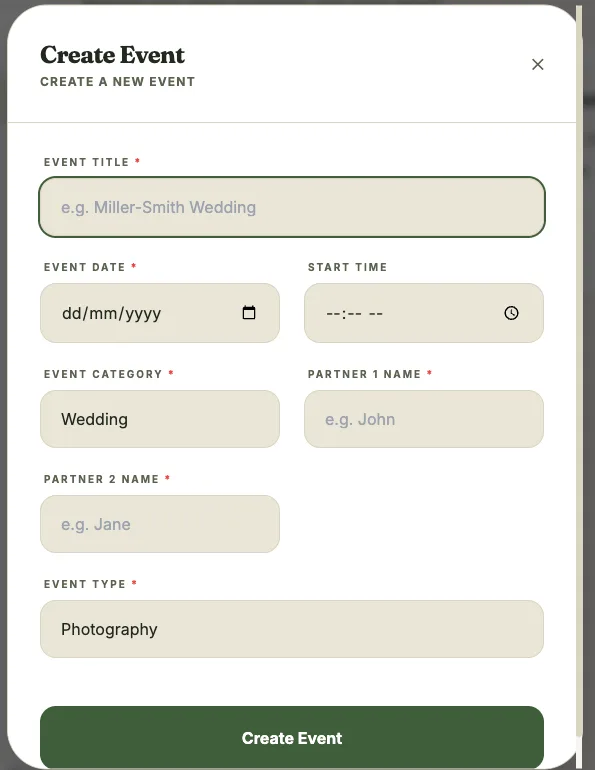
Section titled “Creating an event”- From the dashboard or the Events page, select New Event
- Enter a title and date (required), plus an optional start time
- Choose an event category (Wedding, Portrait, Commercial, Birthday, Live Stream, or Other) and an event type (Photography, Videography, or Both)
- For weddings, enter both partners’ names; for other categories, enter client names or a brand
- Save
Once created, the event becomes the home for its brief, timeline, shot lists, inspiration board, and any run sheet you export for it. A blank gear checklist is also created automatically alongside it. See Checklists.
Editing an event
Section titled “Editing an event”Open the event and select Edit to update any of its details at any time. Changes are reflected immediately across the event brief, timeline, and any shared links. Weddings also let you set prep, ceremony, and reception locations here, plus wedding party names and an emergency contact. See The event brief.
Deleting an event
Section titled “Deleting an event”Deleting an event is permanent for everyone on the team, including any collaborators. It also removes the event’s linked checklist. If you’re a collaborator rather than the owner, you’ll see Leave instead, which only removes your own access.